RefGraph
Description
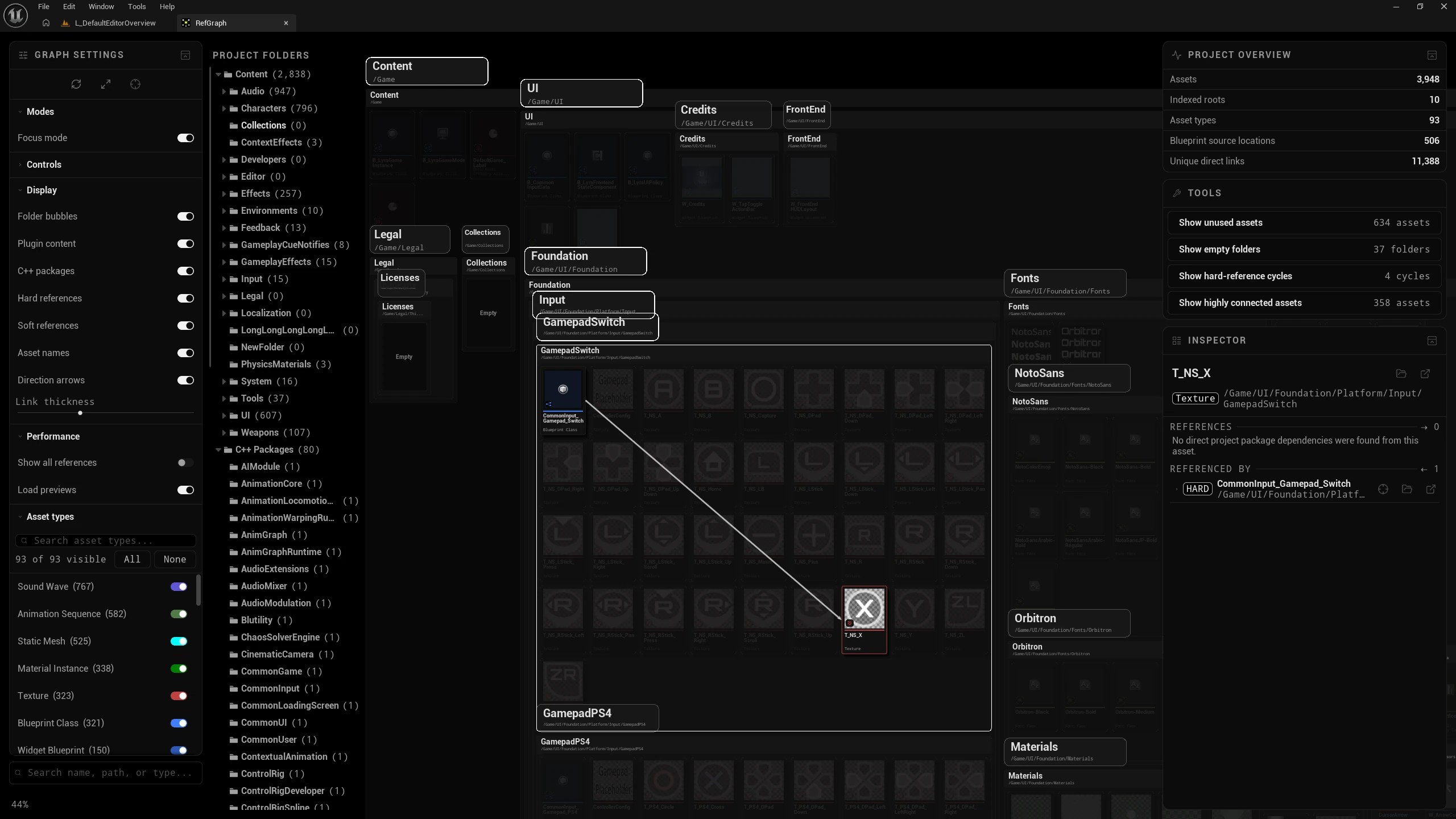
RefGraph is a project-wide asset map for Unreal Engine that shows your entire project on one screen, helping teams get familiar with the structure of complex projects, review content during meetings, and understand how assets are connected and where they are used.
- Project-wide overview: See assets in their folder hierarchy, with thumbnails and asset type colors.
- Visual navigation: Pan, zoom, search by name, path, or type, and open assets and folders directly from the map.
- Reference viewer: Inspect incoming and outgoing hard and soft references and follow connections between assets.
- Blueprint reference tracing: Locate the source of references and jump to exact nodes or pins (when possible).
- Project review tools: Find unused assets, empty folders, hard-reference cycles, and highly connected assets.
- Plugin content and C++ packages: Include enabled project plugin content and referenced native modules in the map.
Thank you for your purchase! I hope my product will be useful to you.
If you like it, please consider leaving a ⭐⭐⭐⭐⭐ review. It would help me a lot!
If you have any questions, feel free to ask on the Discord server.
🍀 Good luck with your projects!
Documentation
This documentation explains how to install RefGraph, navigate the project map, inspect references, and use the built-in project tools.
Plugin Installation
- Install RefGraph through Fab for your Unreal Engine version: 5.6, 5.7, or 5.8.
- Open your project in the matching Unreal Engine version.
- Open
Edit > Pluginsand search forRefGraph. - Enable the plugin and restart Unreal Editor when prompted.
- Open
Tools > Open RefGraphin the RefGraph section of the menu.
RefGraph is an editor-only plugin. It does not add runtime code or content to a packaged game.
Quick Start
- Open a project with saved assets, then open
Tools > Open RefGraph. RefGraph builds the project map. - Find a familiar asset with the search field or Project Folders tree.
Select the asset and press
Fto center it. - Read REFERENCES in the Inspector to see what the asset depends on, and REFERENCED BY to see which assets depend on it.
- Expand a HARD relationship to inspect its source. For a supported Blueprint reference, use the locate action when an exact location is shown.
- After saving changes to project assets, click the refresh icon at the top of Graph Settings to scan again.
You can also right-click an asset or supported folder in the Content Browser and choose Open in RefGraph to go straight to that selection.
Project Map
RefGraph indexes project assets and displays them inside their Content Browser folders. Asset cards use the asset type color, icon, and thumbnail supplied by Unreal Editor. Nested folder regions preserve the project hierarchy, so the map can be read as a visual overview of the project rather than as an isolated reference tree.
- Select an asset to show its direct reference lines and details.
- Double-click an asset to open it in its editor.
- Double-click a folder to open that location in the Content Browser.
- Use the Project Folders tree to focus any indexed folder on the map.
- Use the search field to find assets by name, path, or type.
- Use the Asset types section to show or hide whole asset categories.
RefGraph also adds Open in RefGraph to supported asset and folder context menus in the Content Browser.
Mouse and keyboard controls
| Input | Action |
|---|---|
| Right or middle mouse drag | Pan the map |
| Mouse wheel | Zoom around the pointer |
| Left-click | Select an asset or folder header |
Double-click left mouse | Open a folder or asset |
F | Focus the selected folder or asset |
B | Toggle folder bubbles |
Ctrl+F | Focus the asset search field |
The three icons at the top of Graph Settings rescan the project, fit all
visible assets, and center the selection. Select a folder in Project Folders
or click its header on the map, then use the center-selection icon or press F
to center the folder together with its assets and subfolders. Click the map
before using F or B if a text field currently has keyboard focus.
Search and asset types
Search is case-insensitive and supports multiple terms. Every term must match.
Use path: and type: to narrow the results:
| Example query | Finds |
|---|---|
character | Assets whose name, path, or type contains character |
path:/Game/Characters | Assets under a matching package path |
type:Texture | Assets with a matching type name |
path:/Game/Characters type:Texture | Textures in matching character folders |
Select a search result to focus it on the map. In Asset types, use the switches to show or hide categories, or use All and None before choosing the types you want. The search inside this section filters the type list.
What is included in the map?
The main content root is /Game. With Plugin content enabled, the map also
includes mounted content from enabled plugins stored in the project. Content
from the engine installation, including plugins installed there, is excluded.
C++ packages adds referenced native /Script modules as package nodes.
These are module dependencies exposed by Unreal, not individual C++ files,
functions, or a source-code call graph.
Graph Settings
Display
- Folder bubbles keeps folder names readable while zoomed out.
- Plugin content includes enabled project content plugins in the map. It is enabled by default; changing it rescans the graph.
- C++ packages includes referenced native
/Scriptpackages. It is enabled by default; changing it also rescans the graph. - Hard references and Soft references control the relationship types drawn on the map.
- Asset names and Direction arrows control card and line presentation.
- Link thickness adjusts how prominent the reference lines appear.
An arrow points from the asset holding the reference to the referenced asset. Hard references use light solid lines; soft references use blue lines. A hard dependency can cause its target to load with its source. A soft reference does not require that target to load with the source; when it loads depends on your project code.
The hard and soft reference switches change the displayed links. Project tool results still use both reference types from the indexed graph where applicable.
Performance
- Load previews enables asset thumbnails. Disable it when opening very large projects if lower memory use and faster navigation are more important than thumbnails.
- Show all references draws every visible relationship. It is disabled by default because a full-project edge set can be visually dense and more expensive to render.
Modes
Focus mode keeps the selected asset and its directly connected assets at full opacity while fading unrelated content. It changes presentation only; it does not hide references or remove assets from the map.
Display options, asset type visibility, panel expansion state, and the connection threshold are saved automatically in the project's local editor preferences. You do not need a separate Save button.
Inspector
Selecting an asset opens its Inspector entry. The Inspector lists:
- REFERENCES: assets referenced by the selection;
- REFERENCED BY: assets that reference the selection;
- whether each relationship is hard or soft;
- the package-level evidence known to Unreal's Asset Registry.
Inspector actions can focus the related asset on the map, browse to it in the Content Browser, or open it in its editor. When an exact Blueprint source location is available, RefGraph can also open the Blueprint at the node that creates the relationship. For asset types where Unreal exposes only a package dependency, RefGraph opens the source asset instead.
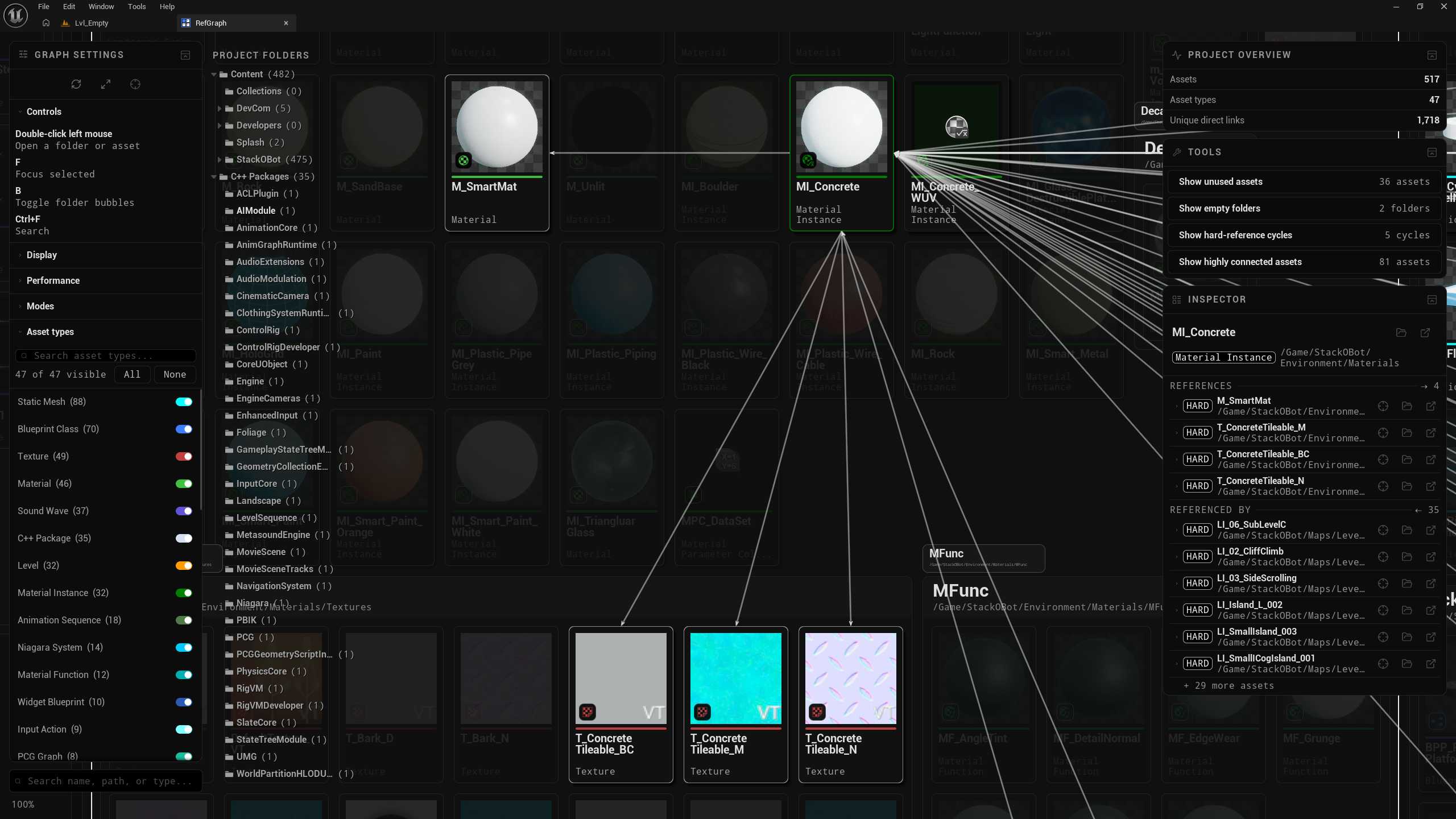
Select an asset to inspect both directions of its dependencies. Use the expand icon to view the screenshot at full size. The example project assets are not included with RefGraph.
Find the source of a hard reference
- Select an asset and expand a HARD row in REFERENCES or REFERENCED BY.
- RefGraph inspects the source asset. For Blueprint sources, it can identify causes such as parent classes, interfaces, components, variables, casts, and node or pin references.
- Read the source location and confidence label. When an exact node or pin is available, click the locate icon to open the Blueprint at that location.
- If no exact location is available, open the source asset and inspect its defaults, components, variables, or dependency settings manually.
The package relationship and its source location are separate pieces of information. A confirmed relationship can still have an unresolved location. EXACT, LIKELY, POSSIBLE, and MANUAL CHECK describe the confidence of the source explanation. They do not mean every relationship has a clickable Blueprint node. Soft references provide package information without exact Blueprint source tracing.
Project Tools
The Tools panel provides factual views over the indexed project data:
- Show unused assets shows assets with no incoming hard or soft package references in the indexed project.
- Show empty folders shows indexed Content Browser folders with no assets and no child folders.
- Show hard-reference cycles shows strongly connected groups formed by direct hard references. Red directional lines show the cycle links.
- Show highly connected assets shows assets with at least
5,10,100,500, or1000unique direct relationships.
Click a tool to filter the map to its results. Click the active tool again to return to the full map, or choose another tool to switch views. The unused, empty-folder, and cycle tools are disabled when they have no results. The highly connected view lets you adjust its threshold. Asset type visibility still applies to the map.
Review unused assets and empty folders
Use Show unused assets to find candidates for a manual cleanup review. The result means no incoming hard or soft package reference was found within the current scan scope. Native C++ package nodes are excluded from this list. Check project entry points, enabled plugin content, and your loading code before deciding whether an asset is unnecessary.
Show empty folders displays folders with neither indexed assets nor child folders. Each result is drawn with an Empty slot. Double-click the folder to inspect it in the Content Browser.
Investigate cycles and highly connected assets
A hard-reference cycle is a path of hard dependencies that leads back to its
starting asset, such as A → B → C → A. Use Show hard-reference cycles to
isolate the participating assets and follow the red arrows. Select an asset
and expand its hard relationships in the Inspector to investigate how the
cycle is formed.
For Show highly connected assets, choose a threshold after activating the tool. The default is 10. Incoming and outgoing hard and soft relationships are combined, and each directly connected neighboring asset is counted once. This helps find shared assets and project hubs before investigating them.
These views describe reference topology; they do not decide whether project architecture is correct or incorrect.
Even if an asset is marked as unused, it may still be in use. Unreal Engine may miss references from C++, config files, and dynamic paths. Do not delete these assets unless you are completely sure they are not used anywhere.
Reference Data Limitations
RefGraph uses the dependency data exposed by Unreal Engine's Asset Registry. The graph contains direct game-relevant package dependencies within its scan scope; editor-only package links are excluded. Code-driven loads, configuration values, dynamically assembled paths, and external systems may not appear as package references. Dependencies outside the included content roots are not a complete part of the graph.
Save assets and refresh after editing references. The map is a snapshot of the indexed data, not a live trace of which assets your game loads at runtime. Connection counts and cycles do not measure memory usage or loading time.
RefGraph provides inspection and navigation tools. It does not automatically delete assets, rewrite references, or repair cycles.
Performance
Scanning and laying out the graph take longer as the number of assets and references grows. Thumbnail generation and source inspection can load assets into the editor. Actual responsiveness depends on the project and hardware.
- Keep Show all references off to inspect the selected asset's connections.
- Disable Load previews for lighter navigation; asset type icons remain.
- Use search, the folder tree, and asset type filters to concentrate on the area you are investigating.
- Disable Plugin content or C++ packages if those parts of the graph are not needed for the current task. Remember that this changes scan scope.
Troubleshooting
The map is empty or an asset is missing
Save the asset, then use the refresh icon or Scan again in the empty view. Check Plugin content for project plugin assets and C++ packages for native modules. Turn off any active project tool, choose All under Asset types, and fit the view. Content stored under the engine installation is outside RefGraph's content scan scope.
I cannot see reference lines
By default, only the selected asset's connections are drawn. Select an asset with dependencies and check the Hard references and Soft references switches. Make sure the related asset types are visible. Enable Show all references if you want to see the complete visible set of links.
A reference is confirmed, but Locate cannot open an exact node
Unreal can report a package dependency without exposing its exact source field. Exact source tracing is available for supported Blueprint hard references; other cases require inspecting the source asset. Save the Blueprint and refresh if its graph has changed since the last scan.
An asset I use appears in the unused list
Check whether it is an entry map, is referenced through configuration, or is loaded dynamically or from C++. Also check references from content excluded from the scan. The unused list alone cannot establish that deletion is safe.
If you need help, send the Unreal Engine version, RefGraph version, reproduction steps, and a screenshot of the relevant Inspector entry to Discord support.
Supported Unreal Engine Versions
RefGraph v1.1 supports Unreal Engine 5.6, 5.7, and 5.8 on Windows (Win64). Builds and all 28 automation tests passed on Unreal Engine 5.6.1, 5.7.4, and 5.8.2.
| Unreal Engine | 5.0 | 5.1 | 5.2 | 5.3 | 5.4 | 5.5 | 5.6 | 5.7 | 5.8 |
|---|---|---|---|---|---|---|---|---|---|
| Product version | — | — | — | — | — | — | v1.1 | v1.1 | v1.1 |
Changelog
v1.1
- Added folder centering with the center-selection icon in Graph Settings.
Select a folder to center it together with its assets and subfolders; the
Fshortcut also supports folder focus. - Added support for Unreal Engine 5.6 and 5.7.
v1.0
- Initial release