Surface Wetness
Development preview. Surface Wetness is not yet released on Fab.
Surface Wetness is a material function library for damp surfaces, glossy wet patches, and puddle-like shading on upward-facing surfaces. Coverage and drying are artist-controlled material parameters. The effect does not simulate water.
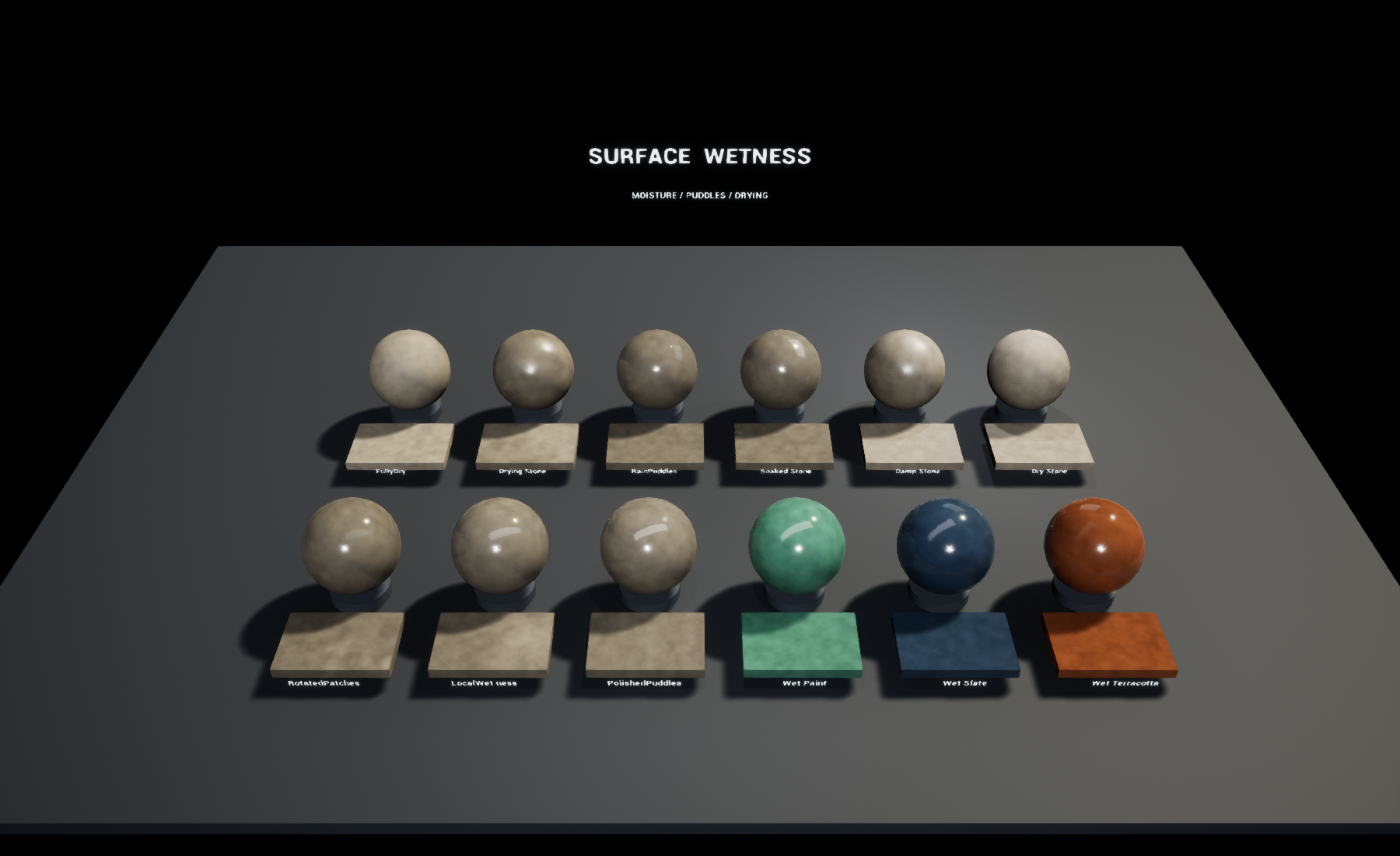
Native Unreal Engine 5.0.3 capture of the included overview.
First result
- Open the included
SurfaceWetness.uprojectin Unreal Engine 5.0.3. - Open
SurfaceWetness/Maps/L_Overviewto compare the twelve presets. - Apply
MI_RainPuddles,MI_DampStone, orMI_WetTerracottato a static mesh. - Duplicate the instance before editing. Adjust Amount, WorldScale, and Transition in the instance editor.
The overview uses a fixed camera in Play mode and shows the mouse cursor. It does not need project Action Mappings. Use the normal editor viewport controls to inspect individual examples.
Add wetness to your material
The functions are in SurfaceWetness/Materials/Functions:
| Function | Purpose |
|---|---|
MF_SurfaceWetness_Mask | Produces wetness, puddle, drying-front, and micro-noise masks. |
MF_SurfaceWetness_Apply | Applies wetness to incoming Material Attributes. |
Pass your existing Material Attributes to the Apply function's Base input. Connect the Mask function's WetMask and PuddleMask outputs to the matching Apply inputs. Connect Result to your material's Material Attributes input. For a material using individual pins, use Break Material Attributes and connect the channels required by your shading model.
The Apply function changes base color, roughness, specular, and puddle normal flattening. Other standard UE 5.0 material attributes pass through. A zero WetMask returns the incoming attributes unchanged. The included master is an opaque, Default Lit, tangent-space-normal example; integration into other shading models requires your own validation.
Coverage controls
| Input | Meaning |
|---|---|
| Amount | Coverage driver from 0 to 1. Zero disables wetness. |
| LocalMask | Multiplies Amount. Supply a texture channel or vertex-color channel for local control. The example master uses a scalar. |
| Transition | Drying progress from 0 to 1. At 1, all wetness is removed. Animate this value yourself using a dynamic material instance or Sequencer. |
| WorldScale | Approximate world-space patch size in centimeters; values below 1 are clamped. |
| Rotation | Rotates the coverage field around world Z, in degrees. |
| Patchiness | Blends from more even coverage to the procedural patch field. |
| SlopeBias | Strength of puddle-like shading on upward-facing surfaces. It does not locate geometric depressions. |
| Position | Sampling position. Defaults to world position; supply custom coordinates to change anchoring. |
| GeometricNormal | Coverage orientation. Defaults to vertex normal in world space. |
DryingFront is an optional mask output for your own blend. It is not connected to the included application helper. It marks the moving transition boundary, not a persistent stain left behind by water.
Surface response
Darkening controls how much wet areas darken. WetRoughness sets their roughness; PuddleRoughness controls the smoother upward-facing regions. Both roughness inputs clamp to 0.02–1. NormalFlattening smooths the incoming tangent-space normal in puddle regions.
The sample master also exposes BaseColor, BaseRoughness, BaseMetallic, and BaseGrain for its procedural substrate. Replace that substrate with your own material when integrating the functions.
Included examples
Dry Stone, Damp Stone, Soaked Stone, Rain Puddles, Drying Stone, Fully Dry, Wet Terracotta, Wet Slate, Wet Paint, Polished Puddles, Local Wetness, and Rotated Patches.
Migration and limits
Migrate the SurfaceWetness folder using Unreal's Content Browser Migrate
action. Keep its folder name to avoid reference conflicts. The package is
self-contained and does not require another Surface Tools product.
- Authored and visually checked in Unreal Engine 5.0.3. The archive also passed asset loading and a Windows SM5 cook in 5.8.2. Demo startup was checked in 5.0.3; other versions and mobile, VR, and consoles remain untested.
- World-space patterns remain fixed when a mesh moves. Supply alternative Position coordinates for a different behavior.
- Puddles are surface shading: there is no water mesh, depth, flow, collision, refraction, or physical evaporation.
- Use tangent-space normals with the included Apply helper. World-space normal materials need adaptation.
- Reflections and lighting affect the visible wetness. Validate the effect in your target scene and rendering settings.
- No performance budget is claimed. Profile the actual material and target hardware.